
Download Seekr – Local Delivery, Food Delivery, Grocery Delivery, Small Business Support, 2-Mile Radius, Android App, Free Delivery App, Online Shopping
Overview
Seekr is a mobile application designed to connect local consumers with nearby businesses, offering a streamlined platform for ordering goods and services within a 2-mile radius. The app aims to support small businesses—ranging from restaurants and grocery stores to retailers selling appliances, furniture, computers, and hardware—by providing them with a digital storefront. By enabling online ordering and local delivery, Seekr helps these businesses expand their reach without the overhead of large-scale e-commerce platforms.
The primary purpose of the app is to facilitate quick, reliable deliveries while fostering community-based commerce. It is especially relevant in the context of ongoing shifts toward localized digital services, particularly during periods of heightened demand for contactless solutions. The target users include both consumers seeking convenient access to local products and small business owners looking to digitize their operations.
Developed by Smart Tagg Electronics Corporation, Seekr operates exclusively on Android devices and is available at no cost through the Google Play Store. Its core value lies in creating a sustainable ecosystem where local commerce thrives through digital integration.
Key Features & Capabilities
- Local Delivery Network: Seekr operates within a 2-mile radius of a user’s location, ensuring fast and efficient delivery for nearby businesses and customers.
- Multi-Category Marketplace: The app supports a wide range of product types, including food, groceries, electronics, home appliances, furniture, and hardware, enabling diverse shopping needs.
- Business Onboarding Tool: Small businesses can list their products and services directly on the platform, gaining visibility to nearby customers without complex setup.
- Order Tracking System: Users can monitor their orders in real time, from placement to delivery, enhancing transparency and user confidence.
- Free Access Model: The app is available at no cost to download and use, with no subscription fees or hidden charges for basic functionality.
These features support real-world use cases such as ordering dinner from a nearby restaurant, picking up groceries without leaving home, or purchasing a small appliance from a local hardware store. The integration of multiple product categories allows users to consolidate shopping needs into a single platform. For small business owners, the app provides a low-barrier entry point into digital commerce, helping them maintain operations during economic challenges. The 2-mile radius constraint ensures that delivery logistics remain manageable and timely, reducing wait times and increasing reliability. While advanced analytics or marketing tools are not specified, the app’s focus on simplicity and accessibility suggests a user-centric design philosophy aimed at practical, everyday use.
User Interface, Workflow & Performance
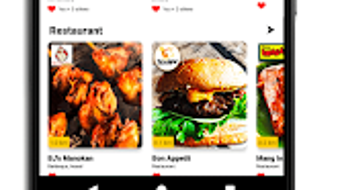
Seekr features a clean, intuitive interface designed for ease of navigation on mobile devices. The layout prioritizes quick access to categories, nearby businesses, and active orders. Users can browse products, add items to a cart, and complete purchases with minimal steps, reflecting a streamlined workflow optimized for mobile use.
The app’s navigation appears to follow standard Android patterns, with bottom navigation bars and clear menu labels, reducing the learning curve for new users. While specific performance metrics are not available, the app’s lightweight design—reported at 25 MB—suggests efficient resource usage and fast loading times. The developer did not specify resource usage details, so actual CPU or RAM behavior remains unconfirmed.
Stability during extended use is not documented, but the app’s focus on local delivery implies a need for consistent background operation for order updates and location tracking. Overall, the interface appears tailored for quick, on-the-go interactions, ideal for users seeking immediate access to local goods and services.
Compatibility & System Requirements
Seekr is designed exclusively for Android devices and requires version 1.0.0 of the app to function. The installation size is 25 MB, indicating a lightweight footprint suitable for a broad range of Android smartphones and tablets. The developer did not provide additional system requirements, such as minimum RAM, processor speed, or Android OS version.
Compatibility information is limited to the platform and version mentioned. It is unclear whether the app supports older Android versions or requires specific hardware features like GPS or internet connectivity. The developer did not specify whether background processes or location services are required for full functionality.
Without further details, users should ensure their device meets standard Android requirements for app installation and operation. The absence of detailed technical specifications means compatibility may vary depending on individual device configurations.
Pros and Cons
Pros
- Free to download and use with no subscription fees
- Focuses on local businesses, supporting community commerce
- 2-mile radius ensures fast, reliable delivery times
- Supports a wide variety of product categories for diverse needs
- Lightweight installation size (25 MB) for efficient storage use
Cons
- Available only on Android, limiting access for iOS users
- Exact system requirements were not listed
- Performance and resource usage details were not provided
- Limited to a 2-mile radius, which may restrict reach in rural or low-density areas
- No information on customer support channels or update frequency
FAQ Section
Is Seekr available for iOS devices?
As of now, Seekr is only available for Android devices. There is no official release for iOS platforms.
Is the app safe to use?
Seekr is available on the Google Play Store, which provides a layer of security through app review processes. However, the developer did not provide specific details on data encryption, privacy policies, or security practices.
How often does Seekr update?
The current version is 1.0.0. No information was provided about update frequency or release schedule.
Does Seekr require an internet connection?
Yes, the app requires a stable internet connection to access business listings, place orders, and track deliveries.
Can businesses use Seekr without paying fees?
The app is free to download and use for consumers. While the developer did not specify business pricing, the free model for users suggests a potential fee-free onboarding for small businesses, though this is not confirmed.
Final Thoughts
Seekr presents a focused, community-driven solution for local commerce by connecting consumers with nearby businesses through a simple, accessible Android app. Its 2-mile radius model ensures timely delivery and supports small enterprises in adapting to digital demands. The app’s lightweight design and free access make it a compelling choice for users seeking convenient, localized shopping options.
While it lacks cross-platform availability and detailed technical disclosures, its core functionality is clear and practical. For individuals who value supporting local businesses and prefer fast, contactless delivery, Seekr offers a viable alternative to broader e-commerce platforms. The app’s emphasis on proximity and simplicity aligns well with current trends in hyperlocal services.
With room for expansion in features and compatibility, Seekr stands as a promising tool for urban and suburban communities alike. Download Seekr now.







